An earlier guide on this site, The Anatomy of a .skill File, took a skill apart: what goes in one, and what separates a skill you would run on a client file from one you would not. That guide was about the format. This one is an application of it: one skill, for one accountant's problem with check images, from the first message I typed to the last.
A skill is a procedure you have written down for Claude. It is a text file in plain English, written the way you would write it for a new hire who has never seen your process, with a label at the top that says when to use it. Once Claude has the file, it follows the procedure whenever the work in front of it matches the label.
The skill in this article splits the checks out of a bank statement.
It started with a call in September. An accountant at a bookkeeping firm we work with was describing one of his clients. This client's bank does not send check images on their own. They arrive inside the monthly statement PDF. The first few pages are an ordinary statement, and the rest are check images laid out in a grid, as many as sixty-nine to a page.
He needs every one of those checks in QuickBooks. So he screenshots a check, reads the payee off the picture, uploads it, and goes back for the next one. He called it one of the most painful accounts he has. It is not hard work, just very manual.
The skill does the screenshotting and the reading. You give Claude the statement PDF. It finds every check on every page, saves each one as its own image file, and reads the check number, date, payee and amount into a spreadsheet, one row per check, matched to its line on the statement.
I built it by typing to Claude: forty messages over three days, and no code. The rest of this article is those forty messages, in the order I typed them. With each one is what I was thinking when I typed it, and what came back.
One note before it starts. Every check and statement pictured in this article is synthetic. Claude drew them for testing. None is a real check, and the accountant's real statements were never used. The bank, business and payee names on them were generated, and any match to a real one is a coincidence. The other material used in testing, a bank's sample statement and research datasets of cheque images, is publicly available.
The first message
About two weeks after that call, I sat down to work on it. I did not remember the details, only that it was about checks and that the call had been recorded. My Claude is connected to my meeting notes, so it can read the transcripts.
Okay, Check the latest call from [their accountant] we had over a transcript. I think he was talking about a check splitter or something. He was having a problem with one of his clients where he had to take a bunch of information and be able to split the check or something like that.
Searched my meeting notes · found the September 10 call · read the transcript
It was a check-image splitter, not a bill splitter. […]
The problem (client: [their client])
- [their client] bank puts every month's check images inside the statement PDF, and there are a lot of them. […]
- He called it "one of the most painful accounts" he has. It isn't hard, just very manual: he screenshots each check, reads the payee and memo (sometimes by uploading the screenshot to Google Images), and uploads each one to QBO separately.
- He wants the check images pulled out of the statement and saved one by one. Then his team can review them later without digging back through the whole statement.
Every message in this article is shown like that: what I typed, word for word, then what Claude did, then its reply. The real firm, its accountant and their client came up in my prompts, and their names are replaced with brackets. Every name that is shown, on a check or a statement, is made up. A […] marks where I cut the reply short. You will count more than forty boxes. The extra ones are short notes I sent back on a plan, and messages I sent and then took back. I say so where they come up.
I dictate most of what I send, which is why it reads like talking, and why the accountant's name came out wrong.
The "or something" was on purpose. I could have described the problem from memory, but Claude takes what you tell it at face value. If I had been specific about the wrong things, it would have gone to work on my description. So I told it where to look and left the rest loose.
I built this in Claude Code, which is Claude set up for building software. You probably use Claude in the browser, or in Cowork, Claude's app for longer jobs. Where I do something you cannot do there, I say what to do instead. Here, if your Claude is not connected to your notes, attach the transcript or paste it in.
The habit: when something is written down where Claude can read it, send Claude there. Do not summarize it from memory first.
A question about my own product
Legix is the accounting software I build. The Legix MCP is the connection that lets Claude work inside it, and an earlier guide covers what those are.
Do we have an example we could test this on? Either through the legix mcp to get documents or find an online one one as a sample? Also, remind me again, can the legix mcp read/upload documents?
Looked for the client in Legix · searched the web for a sample statement · read the source code of the Legix MCP
Can the Legix MCP read or upload documents? It can read them but not upload them. […]
Test examples, so far:
- Legix: there's no [their client] client, which matches [their accountant] saying those clients aren't in Legix yet. […]
- Online: the best public find is a 2-page sample statement from Impact Bank. It lists 9 paid checks (numbers 1234-1249, with amounts), but its "Check Images" section is empty. No public statement I found has the check images included. […]
I asked about my own product because I did not remember. We build quickly, and once I have decided how a tool should work I stop carrying the details. Asking also made Claude read how the connection works, so it knew what it could do with it for the rest of the conversation.
The habit: ask Claude to go and look, even at something you could answer yourself. The looking is how it learns what it is working with.
Yeah, could you give me the URLs for the web pages those links are on, not the actual download links themselves?
Opened each page to check where the files are linked
Here are the pages each file is linked from, not the files themselves: […]
Describing the real document
Claude had never seen the accountant's statement. I had.
The problem with the Impact Bank electronic disclosure page: the sample statement is just a bank statement. What I need is a bank statement, the first few pages, but then the rest of the pages are all these multiple checks per page. Could be 69 checks on a single page. Does that make sense?
Searched twice more for a public example
Yes, that makes sense: a few statement pages, then many pages of check-image grids. Public examples of that are very hard to find. […] I think there are three realistic ways to get one:
- Legix data. […]
- Ask [their accountant] for a real [their client] statement. […]
- Build a synthetic one now. […]
Because we'd write the file, we'd also know the right answers for grading: where each check sits on its page, and which transaction it belongs to. […]
The number is the part that mattered. "Multiple checks per page" could mean six. Sixty-nine means each check is the size of a thumbnail.
The habit: describe the real thing, and include the number.
A plan that was too big
3. three is an interesting idea. How would you approach this?
Here's how I'd build it. The main idea is to create the ledger first and render everything from it. Then the correct answers come for free and nothing has to be labeled by hand.
1. Generate the ledger (the answer key) A script with a fixed random seed creates one month of activity for a fake business:
- about 150 transactions, including N checks
- each check gets a number, date, payee, amount and memo
This is saved as truth.json and becomes the answer key for everything below.
2. Render the statement pages (the first 2-4 pages) Standard layout: summary, transaction list, a "Checks Paid" table, and some checks marked out of sequence (*). These are text PDF pages, the way real bank statements usually are.
3. Draw our own US checks rather than use the Hugging Face set The Hugging Face set is Indian cheques, which have a different layout and fields (IFSC codes, no US-style MICR line). A model that learns from those would be learning the wrong format. I'd draw each check from HTML or SVG instead:
- bank name, check number, date, payee, the amount in numbers and in words, memo
- a fake MICR line at the bottom (routing
000000000) - a signature in a Google handwriting font, which also sidesteps [a colleague]'s privacy concern entirely
Each check then gets made to look scanned: slight rotation, grayscale, noise, JPEG compression, and sometimes a back side with an endorsement.
4. Lay out the check-image pages (the rest of the PDF) Place the checks in grids at different densities:
- 6 per page (2×3, front and back), like Chase
- 10-20 per page
- up to 69 per page as small thumbnails, like [their client]
These pages are flattened to images, as they are in real statements. There's no text layer, so the model has to read the images.
5. Write the answer key alongside the PDF For each check: page number, bounding box, check number, amount, payee, and the transaction it belongs to. Also recorded: where the statement pages end and the check pages begin.
6. Make a few difficulty levels
| Level | What's in it |
|---|---|
| Easy | 1 statement, 6 checks per page, clean scans |
| Medium | 20 per page, rotation and noise, some out-of-sequence checks, two checks with the same amount |
| Hard | 69 per page, a missing image, a voided check, a deposit slip in the grid, backs mixed with fronts, two months joined into one PDF |
7. Score the splitter against the answer key
- Splitting: did it find every check? Box overlap with a threshold gives precision and recall.
- Reading: is each field right (number, amount, payee, date)?
- Matching: did each check go to the correct transaction?
One thing to decide before building. At 69 checks per page, "splitting" means cropping regions out of a page, not cutting between pages. The flow you described to [their accountant] (find page boundaries, cut into separate documents) covers the statement-to-checks break but not the grid pages. So the feature needs a crop step that turns one page into many check images, and the test file should grade that separately. Worth checking with whoever is building splitting which of the two they're doing now.
Tools and where it lives: Python plus Playwright to render HTML to PDF, and Pillow to add the scan effects. About 300 lines, and the same seed always produces the same file. I'd put it in the legix repo as an eval fixture generator; say if you'd rather it go somewhere else. The MCP can't upload, so getting the file into Legix means uploading through the app.
If you're happy with this, I'll start with the Easy and Hard files and show you a page of each before generating the full set.
Claude had offered a seven-part build. What I needed was one statement to test on that day.
Yeah, I don't necessarily need a whole ledger system. I'm wondering if we can just take that PDF that was given to us (that Impact Bank sample statement), and then maybe we pull some of those random synthetic check images. We put 9 of them on each page, and we add 4 additional pages of it. Does that make sense? And then we could have various variations: * Easy: 1 statement, 6 checks per page * Medium: 20 per page * Hard: 69 per page And then have multiple variants or variations for this. Thoughts?
Checked the page for the check-image dataset
That works, and it's much simpler than what I proposed. Take the Impact Bank sample (2 statement pages), add grid pages of synthetic check images after it, and save a small answer-key file recording where each check sits. Since the script places every check itself, the answer key costs nothing. That's the only part of the ledger idea worth keeping, because it's how we grade the splitter. […]
Things to know before I start
- The checks won't match the statement. […]
- The images are Indian cheques […]
- Your "9 per page" vs. the levels. I'm reading the 6/20/69 levels as replacing the 9. Say if you meant a separate 9-per-page variant too.
Nothing in Claude's plan was wrong. It leans toward building more, and I needed one statement for one demo. If the simple version worked for the accountant, I might come back and build the rest.
Claude also did not know what already existed. QuickBooks exists. Legix exists. It does not know what you do not tell it.
1. That's fine. We can change things up/make it match. Not the most important thing. 2. Also fine 3. THat's fine And maybe we create directory called building-accounting-skills/ And create a new folder for this
Created the folder · downloaded 60 check images · wrote the script that builds the statements
I'll create building-accounting-skills/ at the LGX root with a check-statement-fixtures/ folder in it, then download the images. […]
All three warnings were real. None of them mattered for a first test file.
The habit: Claude does not know what you already have, or how much you need. Tell it, and cut the plan down to that.
Pulling every dataset
I sent the next two while Claude was still building the test files. It picks up a message like that at its next stopping point.
What's in the full dataset?
I'm leaning towards actually pulling everything just as future reference. I don't know, we might be able to use this and inventory all of it. [Claude's list of the four sources, pasted back]
Finished the nine test statements · checked each source's size and licence · started the downloads
Pages look right now. Before pulling "everything", I'm checking how big each source is and how it's hosted. […]
- SSBI's license is CC BY-NC 4.0 (non-commercial). Keeping a copy for reference is fine, but using it to test or train a commercial product like Legix probably isn't allowed. […]
- IDRBT still needs a manual download because it blocks scripted requests. If you want it, grab it from the dataset page in your browser.
Did you get the "IDRBT" one?
No, I didn't get it. The download link returned HTTP 403 (access denied) to my script, and I didn't try to get around that block, so it's the one source not in reference-datasets/. […]
Should I download it through the browser and file it in reference-datasets/idrbt/?
I just downloaded it in the downloads folder
Waited for the download to finish · moved it into the project · added it to the inventory
Yes, I have it now. I moved it from Downloads to reference-datasets/idrbt/ and added it to INVENTORY.md. […]
Clicking the link myself was quicker than answering the question.
The habit: some steps are yours to do.
As much variation as possible
Okay, now that we have these things, maybe we should create 3-5 individual PDF variants of these bank statements. What are my options? How do we approach this?
The 9 files we have now all share the same 2-page Impact Bank statement and differ only in how the check pages look. For 3-5 variants that are really different from each other, I'd make each one test a separate thing the splitter could get wrong. You have four choices to make. […]
My recommendation: statement pages (b), our own drawn checks (d), all 5 layouts, with checks that match the statement. […]
A cheaper version, about an hour: keep the Impact pages and the Hugging Face checks, and build only layouts 1, 2, 3 and 5. You'd give up realistic US checks and matching.
Before the next message I switched on plan mode. In plan mode Claude does not build anything. It writes out the whole route and waits for me to approve it.
I think we should have as much variation as possible, right, because we'll be using these to build out the skill itself. We want to make sure we have enough variety here. Any suggestions?
Asked two questions, each with buttons, before writing the plan
Which check images should go into the variety corpus? Drawn US checks (Recommended) · HF synthetic Indian cheques · IDRBT real scans
How big should the generated corpus be? ~60 files (Recommended) · ~25 files · ~150+ files
I picked all three kinds of check image, and 150+ files. Neither was the recommended answer.
The second and third kinds are public research datasets of cheque images. None of their images appear in this article or in its downloads. Every check pictured here is one Claude drew.
Claude answers one prompt at a time, with its best response for that moment. Left to that, a long build zigzags. By now I could see several steps coming, so I had it lay them out first. In the browser there is no plan mode. Say "plan this, don't start yet."
The recommended button is Claude's best guess from what it knows. What I knew is that real accounting documents are a mess: blurry checks, different kinds of checks, different formats. Give Claude clean test files and it builds for the clean case.
The habit: when you can see further than the next prompt, have it plan first.
Four rejections in four minutes
Claude wrote the plan and asked me to approve it. A plan can be sent back with a note, and Claude rewrites it. I sent this one back four times.
Should we also precreate an answer key as well?
Rewrote the plan · 1,198 words became 1,432 · added a scorer, and a format for the skill's output
anything else we should consider as part of this setup?
Rewrote the plan · 1,872 words · added eight more things to set up
Why is [their accountant] being mentioned?
Rewrote the plan · took the customer's names out of it
Remember we're not creating the skill at all yet. We're just creating the initial materials and a very light way to evaluate this
Rewrote the plan · 934 words · the skill's output format is gone, and six of the eight extras with it
I approved the fifth version.
The first two notes are questions on purpose. Claude tends to assume you already know what you want, and often I do not know what the options are yet. "Should we" and "anything else" give it permission to go past what it thinks I know.
Then it had gone too far. The plan had started designing the skill, which did not exist yet. So the fourth note pulls it back.
A lot of working with Claude is this. Give it broad strokes, then cut, and keep cutting until the plan makes sense. You are marking the edges, so it knows where to go and where to stay.
The habit: open it wide first, then narrow it.
"Both"
Before it started building, Claude asked whether it could install a library that makes PDF pages with real, selectable text. It gave me two buttons: "Yes, install it (Recommended)" and "No, image-only". You do not have to pick a button. I typed this.
Both. statements might have selectable text, but the checks are *usually* image files scanned in
Built the generator, a validator and a scorer · 178 test statements, each with an answer key
Now building the generator. […]
Now the renderer. It turns each page into real PDF text (digital) or pixels (scanned or flattened), applies the scan effects, moves the answer-key boxes with them […]
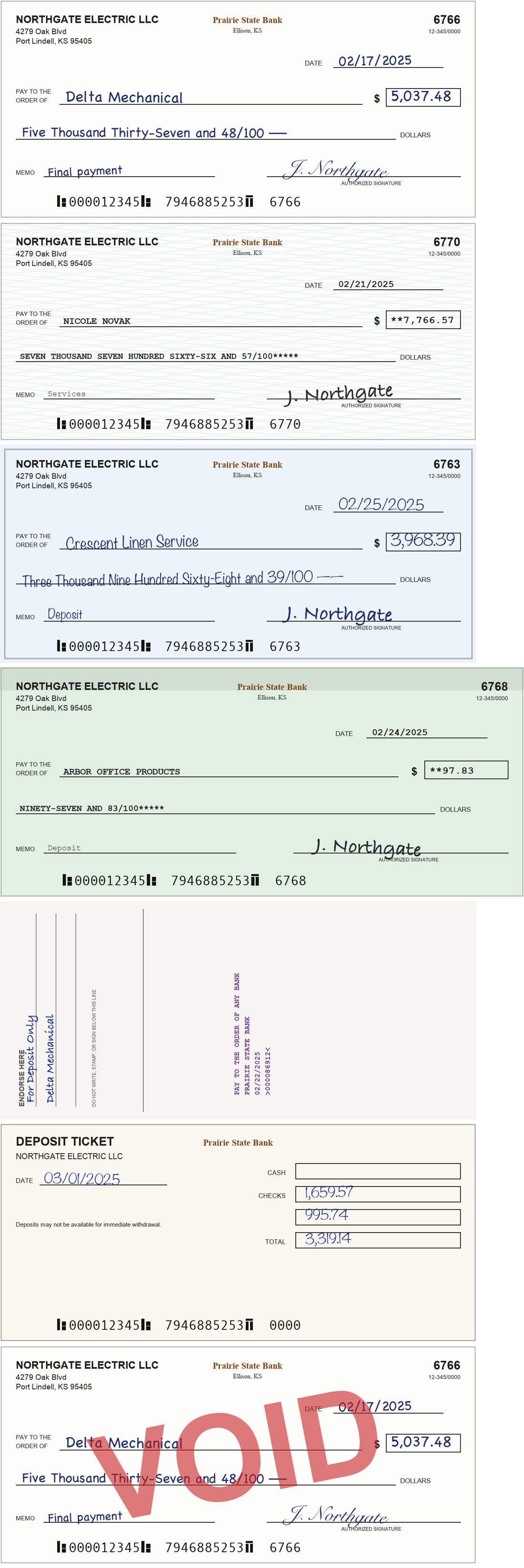
That comes from what I have seen with customers. A clean, sharp image is easy for most systems. What actually arrives is messy, and I was telling Claude what it was about to receive.
The habit: tell it how messy the real thing is.
Keeping the screenshots
Claude had sent me pictures of the test statements it made.
Those screenshots are great. Let's save those somewhere to just keep. A lot of the stuff we're creating I'd like to save so we can track these
Saved the pictures in the project · started a running log
I'll keep them in the project rather than scratch. I'll also make the contact sheets reproducible with a small script, so they can be regenerated after any change and compared over time.
I'm also adding a short running log, so decisions and results are recorded next to the files: […]
Then it asked whether to put the folder under version control, which keeps every past version of every file. The buttons were "Local git repo (Recommended)", "Git + private GitHub repo" and "No git, just files". I picked the second. It keeps a private copy online as well.
I save anything I might build on. If I make another skill this way, the pictures, the plan and the log are there to pull from. I wanted the history so I could always go back. And I wanted this project in a place of its own, so Claude is not reading unrelated files while it works here.
The habit: save what you might build on later.
"Ensure it's isolated"
Okay now what's next?
I'd do these in order. Each step tells you something the next one needs.
1. Run a baseline: see how Claude does with no skill at all (about 1-2 hours) […]
I'd start with step 1. It's quick, needs nothing new, and changes how you'd approach everything after it. […]
A subagent is a second Claude that the first one starts. It begins with an empty memory and knows only what it is handed.
1. Could you do this isolated with a subagent? Ensure it's isolated?
Copied the pages of 14 test statements into a separate folder under blank names · started three subagents that could see only that folder · scored their answers against the answer keys · read their logs
I ran the baseline blind with three subagents, and the isolation held. Finding and splitting the checks already works without any skill. Reading what's written on a check breaks down on dense and blurry pages.
| Result | |
|---|---|
| Check number and amount | 100%, but mostly taken from captions or the statement, not read off the check |
| Payee and date | 0% on the 69-per-page grid (it didn't try) […] |
[…] My test set is too easy. The checks and the statement always agree and are usually in the same order, so a model can match by position without reading anything. […]
Claude never forgets what is in a conversation, and by now this one held the answer keys, the code, and how every test file was made. A Claude that has seen the answers cannot tell me how a fresh one will do. The accountant's Claude will have a PDF and nothing else, so the test got a PDF and nothing else.
In the browser, a new chat does the same job. It starts with only what you put in it.
The habit: test it with nothing in the window that the user will not have.
Harder test files
The next day.
Okay, let's proceed with the next test then
Added six harder kinds of test statement, 24 files · reran the blind test on seven of them
I'll add scenarios that take away the shortcuts from the first run, then rerun the same blind baseline on them. […]
- Dense scans are the one real problem. Every serious miss happened where a check was only about 165×80 pixels on the page. Claude said so itself in its notes, rather than claiming the checks had been verified.
- Guessing by elimination is dangerous. When some images were unreadable, it assigned them to leftover statement lines and got the missing-check answer wrong, confidently. A skill should mark those checks unassigned instead.
[…]
The habit: when the first score is perfect, question the test.
"Did the agent not crop/zoom by itself?"
Can you link to or open up one of those really, really hard ones, the 69 per page?
Opened the file beside the chat
What's in it
- 9 pages. Pages 1-3 are the statement, which lists 200 checks. Pages 4-9 are check images laid out 69 per page, fronts and backs alternating, 406 images in total.
- Office-scan quality: slightly tilted pages with scanner noise, no captions, and the checks in shuffled order.
The traps hidden in it (all check fronts):
| Page | Check # | What's wrong | Check says | Statement says |
|---|---|---|---|---|
| 4 | 1642 | posting error (transposed digits) | 5,972.08 | 5,927.08 |
| 5 | 1475 | posting error (cents) | 447.03 | 446.94 |
| 8 | 1700 | posting error (decimal shifted) | 235.01 | 2,350.10 |
| 8 | 1465 | posting error (transposed digits) | 846.85 | 486.85 |
| 4 | 1851 | not on the statement | 205.80 | - |
| 7 | 1278 | not on the statement | 3,308.40 | - |
| 7 | 1381 | not on the statement | 3,437.82 | - |
The blind subagent caught none of the 4 posting errors and correctly rejected only one of the 3 extra checks (1278). If you zoom in on page 4 or 8, you'll see why: the handwritten amounts are just a few pixels tall. […]
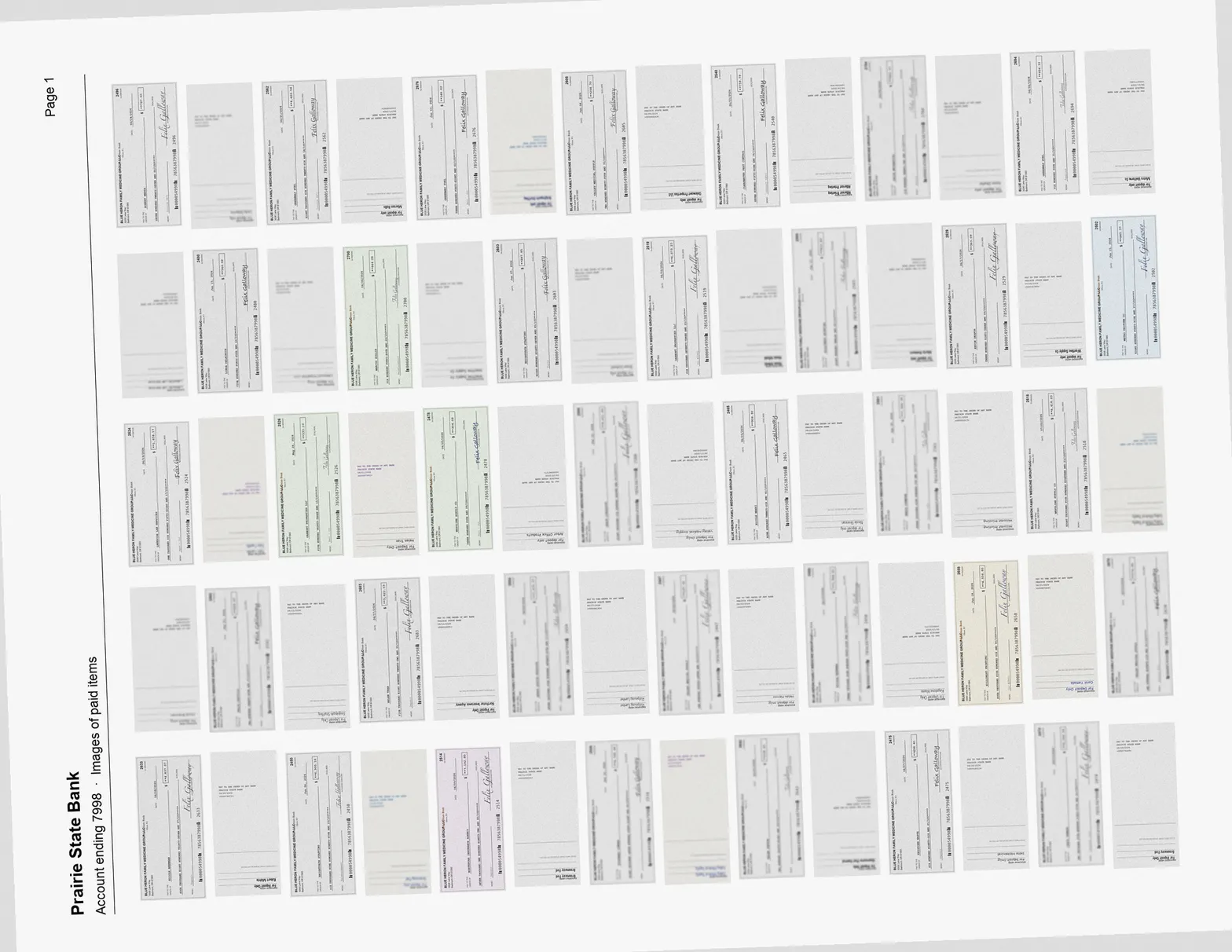
Did the agent not crop/zoom by itself?
No. It couldn't have, and it wouldn't have helped much with what it was given.
- It had no tool to crop with. […]
- Cropping those images wouldn't add detail anyway. […]
The detail does exist in the PDF itself. […]
The test matched production on purpose: through the MCP today, a skill would face the same limit […] The dense-page failures measure that gap, not a model that didn't try. […]
Claude's answer is accurate. It also rests on something it assumed and I never said. The accountant will not use the Legix MCP for this. He will upload the PDF straight into Claude.
A few things to note here: 1. Yes, we definitely should note to increase the MCP's capabilities for Legix at some point, so Crozsion tool may help down the road. Second thing is that, to start, the thing that we're going to be building later, not now, is that we won't actually leverage the Legix MCP per se because we don't have a get document tool. These types of statements don't actually show up in the Legix MCP. It usually shows up in an external system that one of the accountants actually just uploads manually to Claude. Claude, using this particular skill, let's say, would have access to the full document itself. There would need to be instructions to Claude, or a Python something, or anything that allows Claude to be bundled with the skill to kind of zoom in if it chooses to or needs to. Does that make sense? This is separate from the Legix MCP and its limitations.
Added both notes to the log
Yes, that makes sense, and it's a better setup than I'd assumed. It changes what the next test should look like.
What I understand now
- Where it runs: the skill works on a statement PDF an accountant uploads directly to Claude, not on documents fetched through the Legix MCP. The MCP's 1568px limit isn't the constraint here.
- Access to the file: Claude has the whole original file, and the skill can bundle a Python script that zooms in on any part of a page at full resolution whenever it needs to.
[…]
- The right next test gives the blind subagent the full PDF plus a bundled zoom script, like the one the skill would ship with, and lets it decide when to zoom in. […]
"Crozsion" is the dictation again. Claude read it as "crop" and carried on.
I had not looked at how the test was run. I asked because small things are easier to read up close. That is true for a person, and it is probably true for Claude. A lot of how I work with it comes from asking how a person would do the same job.
A couple of hours of testing had been run against a limit the skill will never have.
The posting errors in that table were planted in a synthetic statement. No real account has them.
The habit: tell Claude what it will have in its hands.
An hour of zooming
Proceed
Wrote zoom.py, a program that cuts any part of a page out at full resolution · started three subagents with the full PDFs and the zoom tool
Building zoom.py first. It's the first draft of what the skill would bundle. […]
About forty minutes later:
Still running?
Yes, it's still running. It hasn't sent its completion notice, but it's clearly still working:
- The easy file is done: it finished the shuffled/no-captions file at 13:27.
- It's on the 69-per-page file: it has made 202 zoomed crops so far, the latest at 13:43, on pages 4 and 8. Those are the two pages holding the posting errors.
It's been going about 40 minutes. […]
ok let me know when it's done one note for later, for the sake of speed, we'll probably want to think about how the skill can parallelize this process so it can go faster because one someone first runs the skill it won't be through a sub agent but the main claude
Noted. I've added it to the log as a design item for later, together with the time and cost of this run once it finishes. […]
Subagent A has finished, so all three are done. Zoom fixes the reading problem, but zooming one check at a time is too slow for dense statements. That confirms the speed concern you raised. […]
- One-at-a-time zooming doesn't scale. On the 200-check file it spent an hour cropping and still read only 76 checks. It also hit a limit on how many images one conversation can hold: images briefly came back as "media removed", and it had to redo that work. It told us about this itself.
- Your speed note is now a hard requirement. […]
I said it then because it was in front of me. I could see it going through hundreds of checks one at a time. I also knew where the skill would end up. In the browser there is one Claude working in one lane. In Cowork or Claude Code it can hand pieces of the job to several at once.
One line in that reply says images "briefly came back as 'media removed', and it had to redo that work." The subagent's own note, which I did not see at the time, was blunter: "every image read came back as '[media removed: request limit]', and I wrote a first doc_65.json anyway, so its values were invented." It went back and reread every page once the images loaded.
I take Claude at its word most of the time. You build a sense for it, the way a senior accountant looking at a junior's work knows when something is off without checking every line, and then digs into that part.
The habit: say the constraint when you see it. Do not save it for later.
Twelve checks to an image
Proceed
Added a mode that puts twelve zoomed checks on one image · reran the 69-per-page file
The batched version worked. On the 69-per-page file it took 9 minutes instead of 63, caught all 4 posting errors with no false alarms, and every check it answered was right.
| 69-per-page file | Page images only | Zoom one at a time | Batched sheets |
|---|---|---|---|
| Time | ~10 min | 63 min | 9 min |
| Checks read | 63% | 35% | 64% |
[…] The 36% it didn't read are unreadable. I zoomed into a sample at 3× full resolution and they're blurred beyond recovery in the source image […] So 64% is this file's ceiling, and the subagent reached it without a single wrong reading. […]
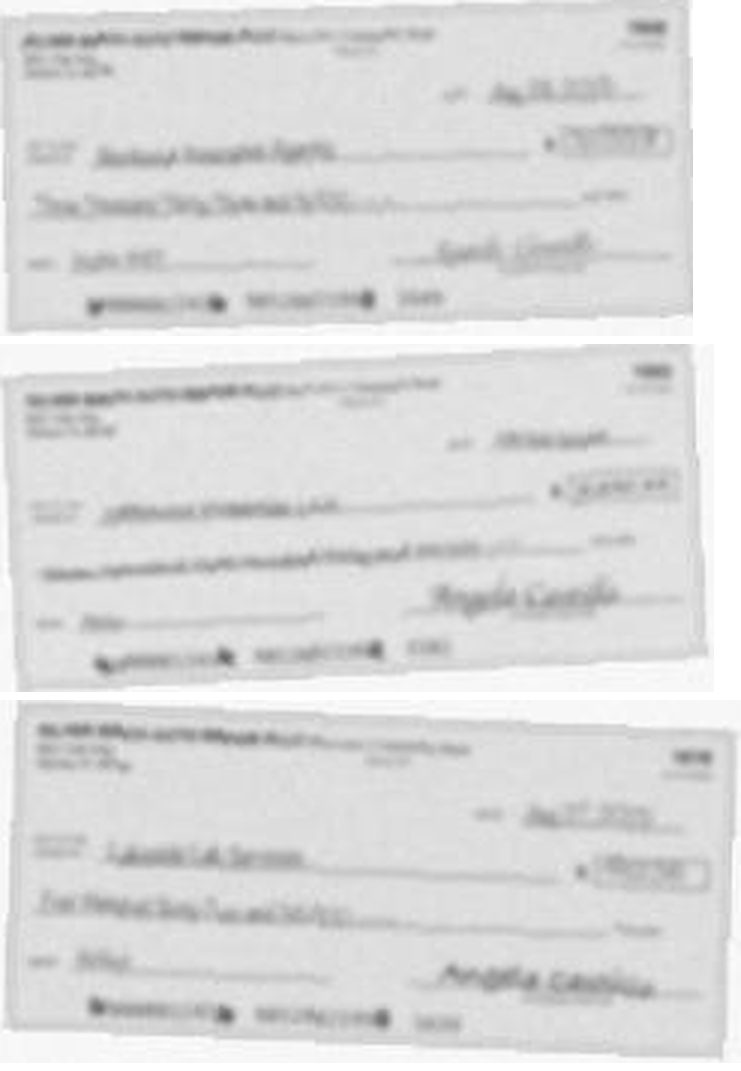
The habit: when it stops short, find out whether the problem is the reader or the material.
One word
That was the second "Proceed". There were four.
Proceed
Marked every check in the answer keys as legible or not · improved how checks are found on a page · ran the workflow with four subagents
[…] Steps 1 and 2 are done:
- Legibility: every check in the answer keys now records how blurred it is. The scorer reports accuracy on legible checks, and the batched run scores 129/129 on those. […]
Proceed
Revised the workflow · ran it on 18 files nothing had seen before · packaged it as a skill
Doing all three in order: workflow v1, then the held-out run, then packaging the skill. […]
The skill is committed as v0.1 at skills/check-statement-reader/, and the package builds to skills/dist/check-statement-reader.skill. […]
By now every report ended with a numbered list of what Claude would do next, and each time it was what I would have chosen. That is how I know it has the right context. I am not correcting anything, so one word is enough.
It only works because of the time spent earlier: setting the context, cutting the plan, looking at the results.
The skill was called check-statement-reader at this point. I renamed it later.
The habit: when its next step is the one you would pick, one word is enough.
Running it like an accountant would
show me the held-out results "Run it once in the main Claude session" -> Could you give me a few sample PDFs I'll open up a new claude session, upload the skill/files and run it.
Listed the results · made a test kit of four statements renamed A to D, with the answer keys in a separate folder
Held-out results, one file per row (blind, workflow v1, files nothing had seen before):
| File | Quality | Checks found | Legible amounts read | Posting errors | Match |
|---|---|---|---|---|---|
| amount_mismatch | flattened | 31/31 | 31/31 | 4/4 | 1.00 |
| hard_combined | office scan | 62/62 | 24/24 | 3/3 | 1.00 |
| dense_69_hard | office scan | 408/408 | 133/134 | 2/4 ⚠️ | 0.67 |
| shuffled_no_captions | office scan | 67/67 | 67/67 | - | 1.00 |
| no_printed_numbers | office scan | 60/60 | 30/30 | - | 1.00 |
| missing_duplicate_void | office scan | 76/76 | 17/17 | - | 1.00 |
| deposit_slips_mixed | office scan | 44/44 | 44/44 | - | 1.00 |
| substitute_checks | office scan | 7/7 | - (Indian stand-ins) | - | 1.00 |
| phone_photo | phone | 30/30 | 15/15 | - | 1.00 |
| front_back_stacked | phone | 114/114 | 57/57 | - | 1.00 |
| front_back_pairs | digital | 86/86 | 43/43 | - | 1.00 |
| inline_on_last_page | flattened | 60/60 | 26/26 | - | 0.93 |
| rotated_pages | flattened | 3/3 | 3/3 | - | 1.00 |
| fax_bw | fax | 14/14 | 8/14 ⚠️ | - | 0.64 |
| not_on_statement_images | fax | 34/34 | 15/34 ⚠️ | - | 0.56 |
| two_statements_joined | fax | 69/69 | - (Indian stand-ins) | - | - |
| […] |
The ⚠️ rows are the two known limits:
- dense_69_hard: the per-conversation image limit dropped some sheets, which is where the 2 posting errors were missed.
- fax files: small checks lose most of what's written on them.
The dense file's 0.67 match is simply its share of legible checks. The full write-up is in REPORT.md.
Your test kit is attached above
check-statement-reader.skill- four statements, renamed neutrally so the file names don't give anything away:
| File | What's inside | What good looks like |
|---|---|---|
statement_A.pdf | clean, 31 checks, 4 posting errors | all 4 flagged, nothing else |
statement_B.pdf | phone photos, 15 checks | notices the detector missed some; still gets all 15 |
statement_C.pdf | 60 checks: shuffled, unnumbered, 3 posting errors, 3 not on the statement, 2 missing, about a third blurred | finds all of that; lists the blurred checks as unreadable instead of guessing |
statement_D.pdf | 204 checks, up to 69 per page | warns it's large, stays within the image budget, reports about 70 blurred checks as unverified |
How to run it
- […]
- Use one statement per conversation, especially D.
- Ask the way an accountant would: "Here's a client's bank statement with the check images. Can you split out the checks, match them to the statement, and tell me anything I need to look at?"
- Note how long it takes, whether it used
zoom.py, and whether you got the check image files andchecks.csv.
Bring back the results.json or checks.csv it produces and I'll score it against the answer keys. The keys, and a README with which file is which, are in check-statement-fixtures/manual-tests/2026-09-25/. Keep that folder out of the test session. It's committed and pushed.
Every test so far had been run by a subagent. A subagent is started by a Claude that knows everything we built, and that Claude writes its instructions. You are relying on Claude to keep things from itself.
A new chat that I open myself has none of that. It has the skill, a PDF and one plain request, which is what the accountant will have.
The four statements in the kit are synthetic. Every name, account number, signature and check on them is made up.
The habit: the real test is a fresh session holding only what the user will have.
A zip with no words
Statement A, in an ordinary Claude chat. I downloaded what it produced and handed it back.
[files_statement_A_output.zip] this was the output
Scored it against the answer key · opened some of the exported images
Statement A came back perfect: every field on every check matches the answer key.
| Result | |
|---|---|
| Check images exported | 31 of 31, one file each, named like check_2163_2025-10-07_9205.05.png |
| Posting errors | all 4 found (2152, 2160, 2161, 2163), no false alarms |
[…] I also opened some of the exported images. They're cleanly cropped, and each one is the check its file name says: #2163 reads $9,205.05 against $2,905.05 posted, and #2195 is stamped VOID. […]
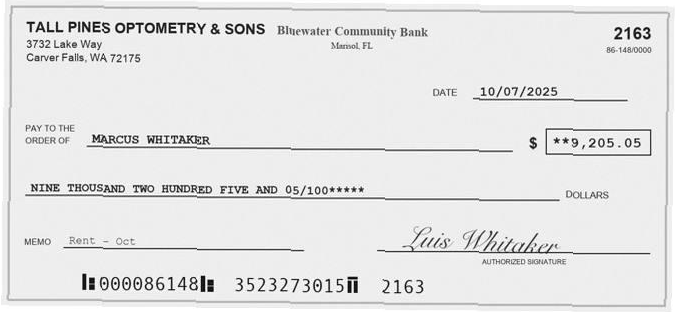
The habit: handing back the output is a prompt too.
Statement B, sent three times
The zip I downloaded for B had only three of its thirty images in it.
[files_statement_B_output.zip] this was the output
This zip has the CSV but only 3 of the check images; the CSV lists 15 fronts and 15 backs. So either the download was partial or the export was cut short. […]
I rewound. In Claude Code a rewind goes back to an earlier point in the conversation, and the message you had sent is gone as if you never sent it. In the browser, editing an earlier message does the same thing, where that is available. I sent B again, this time with the text of the chat reply pasted in.
[files_statement_B_output.zip] this was the output This was the text that session outputted: [the other chat's reply, pasted]
Scored B · found and fixed a bug in the program that draws the test statements
Scoring B the same way as A. One thing in its report stands out right away: the deposit slips "adding up to exactly 80%" smells like a bug in my generator, not in the client's books. I'll check that too. […]
B came back perfect too, and its report caught a real bug, in my generator rather than the skill. […]
Did it split it properly? Part of the main goal of the skill was to split it into individual things
Short answer: I can't fully tell for B. The zip you sent contains only 3 of the 30 images (15 fronts plus 15 backs), even though the CSV lists all 30. […]
That one was my mistake. The chat had shown only a few of the files. The rest were in the files list, not in the chat, and I had not looked there. All thirty were fine. I rewound again and sent the complete zip.
[files_statement_B_output.zip] this was the output
Checked all 30 images against the answer key
Statement B is also perfect, and this zip completes the picture. Another Claude session had already scored B from your first download, which was missing most of the images; this one has all of them. […]
⚠️ One thing needs your attention. checks.py and LOG.md have uncommitted edits in the repo that undo that deposit-slip fix, even though the fix is already committed and pushed. I left them alone in case another session is mid-edit. […]
There was no other session. A rewind in Claude Code also puts the files back the way they were at that point, so the fix Claude made before I rewound was undone on disk. Claude cannot see a rewind. It saw files that had changed and guessed at the reason. It repeated that warning four more times before the end.
I rewind when the setup of a message was wrong, or when the conversation has picked up something I do not want it carrying forward.
The habit: when a message went wrong, go back and send a better one. Do not stack a correction on top of it. And know that going back can undo more than the message.
36 of 37
Statement C was the hard one: sixty-two check images, more than half of them blurred on purpose.
[files_statement_C_output.zip] This was the file output
Scored it · opened one of the blurred checks · rewrote the skill
On the checks that can be read, statement C was perfect. But on the blurred ones, the skill guessed instead of saying it couldn't read them. I've fixed the skill for that; the updated version is attached above.
| C: 62 check images | Result |
|---|---|
| Blurred checks (37) | only 1 marked unverified. The rest were filled in: amounts right, but 17 dates and 5 payees wrong, 2 of them invented names |
What went wrong. I opened one of those exports […] It's unreadable blur, yet the session wrote the payee "Braden Pierce", which is a name that appears nowhere in the data […] The amounts came out "right" because they were copied from the statement. That's the dangerous part: a copied amount always agrees with the statement, so it would hide a posting error on a blurred check. […]
The rule it put at the top of the skill, in its words: "every value must be read off the check's own image. If the amount can't be read, the check is unverified, even when its number is readable."
Claude changed the skill without being asked, and that was fine with me. By this point it knew the goal well enough to make that call. I had not expected it, and I was not surprised.
The habit: a rule that must hold goes at the top of the skill, with its reason.
Regular chat, or Cowork
I'm curious, if run in regular claude web, it can't spin sub agents to parallelize, right?
Right, as far as I know. There's one caveat: features change quickly, and I haven't checked the current claude.ai docs. […]
I rewound and asked again, with one more line.
I'm curious, if run in regular claude web, it can't spin sub agents to parallelize, right? Versus cowork? Can cowork spin up sub agents?
Searched · read Anthropic's help page for Cowork
I'm fairly sure about regular Claude on the web, but less sure about Cowork. Checking current documentation rather than guessing: […]
Short answer: regular Claude on the web can't use subagents. Cowork can, but Claude decides when to, not the skill. […]
My suggestion for v0.4 is to make the skill work both ways:
- Default (plain chat): the current one-Claude workflow with batched sheets. It works everywhere.
- Optional (Cowork or Claude Code): "if you can delegate, split check-image pages into ranges. Each worker reads its sheets and returns results JSON for its pages. You merge, match against the statement, and export." […]
yes, add the delegation path
Added a section to the skill for handing pages to workers · wrote the brief each worker gets
[…] Two design choices worth knowing
- Workers never see the statement, so they can't copy amounts from it. That enforces v0.3's no-guessing rule by construction, and all the matching happens in one place.
- Each worker has its own image limit. That removes the per-conversation limit that caused the misses on the 200-check file. […]
I work in Claude Code. Most accountants do not. I did not know offhand what Cowork or the browser could do, and I did not want to build something that only runs where I work.
The habit: check the place your user works, not the place you do.
Seventy unverified
Statement D: 204 checks, seventy of them blurred, and the rewritten skill.
[files_statement_D_output.zip]
Scored it against the answer key
Statement D passed the test C failed. […]
| D: 204 checks, up to 69 per page, 70 blurred | Result |
|---|---|
| Blurred checks (70) | 70/70 marked unverified, none filled in (C before the fix: 1 of 37) |
| Posting errors on legible checks | 2/2 (2609 and 2515), no false alarms |
[…] The zip didn't answer three questions:
- Was this regular chat or Cowork, and did it delegate?
- How long did it take?
- What did the chat reply say? […]
The first rows of the spreadsheet it produced, with some columns left out. The payees are made-up names on a synthetic statement:
check_number  date        payee                  amount   status
2633          2026-06-08  Nicole Brennan         4837.07  matched
2524          2026-06-1?  Lakeside Lab Services  1658.17  matched
2496          2026-06-24  Robert Mehta           727.0    matched
                                                          unverified
2480          2026-06-15  Linda Delacroix        544.62   matched
Regular chat. And about ~10min
About 10 minutes in regular chat for all 204 checks is a good result. […]
What I'd suggest next
- A small v0.5 wording change: have the report mention that on very small check images, dates and payee spellings may be a digit or letter off. That was the only kind of miss in D.
- A real statement. Everything so far is synthetic. […]
- Housekeeping: […]
do the v0.5 wording change
I've made the v0.5 wording change; the updated skill is attached above. […]
Claude asked three questions and I answered two. It suggested three next steps and I took one. Over the three days it asked plenty that I never answered: how long A took, whether to keep B's extra observations, whether to run C again.
Its questions and suggestions are its guesses at where to go next. I answer the ones that point where I want to go.
The habit: you do not owe it an answer to every question.
Writing it down
Okay, now, what I want you to do. I want you to map every single step that we possibly took through this entire process. Section by section. Why we did one thing, corrected another. I'm trying to write up an extremely comprehensive build guide such that if I were to hand over to someone, they could recreate this skill almost exactly. Does that make sense? Before you write it, any questions? What do you we should cover and how should we cover it?
Yes, that makes sense. Before writing, here's how I'd cover it, and four questions where your answer changes the shape. […]
- Goal: this skill, or the method? […]
- Does the reader have the repo? […]
- Where does it live? […]
- How much of the mess? […]
1. Lean more to the method. I want this to be centered around this skill. But it's suppose to teach someone the thinking process behind the process, approach, and decisions as well. Note this is suppose to be somewhat self-contained, because I'm assuming future builds will have it's own unique process to building it's own skill, not necessarily following this guide exactly. 2. No, they do not. I would just hand them this guide and that's it and they would have access to their own Claude. Most likely Claude Cowork for example. Does that make sense? 3. I just want a markdown document to start 4. Minor things like typos we can remove. But only if that was truly a mistake. But corrections from validation resulted in a fix, I want an explanation of what happened. Even typos can be important especially if it resulted in an undesirable behavior. The reader wouldn't be as familiar with Claude, Agents, Skills, etc. So the guide is suppose to help them train their heuristics and understand the process. Does that make sense? Yes, I'm completely expecting it to be long and comprehensive, but not necessarily verbose.
Reread the log, the reports and the file history · wrote the guide
[…] The guide is written, committed and pushed: BUILD-GUIDE.md, about 12,300 words, attached above. […]
I kind of also want to include the exact prompt, every one of them quoted, that I wrote then what you interpreted my prompt to mean and why. Like a message by message build guide.
This is a good companion to the guide: the guide shows the reasoning in retrospect, this shows it as it happened, one exchange at a time. […]
Small tweaks, we shouldn't mention anything PII, like [their accountant], that's an actual client. So no client names.
Done. Both guides are scrubbed, committed and pushed; the updated files are attached above. […]
scrub the names from the log and reports too
Scrubbed, committed and pushed. […]
I was already building the skill for a customer. I asked for the guide because the skill is not the hard part for most people. The hard part is a new way of working: handing a job over, breaking it into pieces, checking what comes back, and marking where the edges are.
I have built hundreds of these, and what I know about it came from doing it. Most of what is written about prompting stays at broad strokes. I wanted one build written down message by message, for someone who knows the work the skill does.
The message-by-message document Claude wrote from that request is what this article was built from.
The habits, together
Each section above ends on a habit. Here they are in one place, in the order I would use them on a new build.
Load the context. Claude starts with nothing about your firm, your client or your tools.
- When something is written down where Claude can read it, send Claude there. (The first message)
- Ask it to go and look, even at something you could answer yourself. (A question about my own product)
- Describe the real thing, and include the number. (Describing the real document)
- Tell it how messy the real thing is. ("Both")
- Tell it what it will have in its hands. ("Did the agent not crop/zoom by itself?")
- Say the constraint when you see it. (An hour of zooming)
- Check the place your user works, not the place you do. (Regular chat, or Cowork)
Open it wide. Let it show you options you had not thought of.
- When you can see further than the next prompt, have it plan first. (As much variation as possible)
- Ask "should we" and "anything else" before you decide. (Four rejections in four minutes)
Set the edges. Then cut.
- Claude does not know what you already have, or how much you need. Tell it, and cut the plan down to that. (A plan that was too big)
- A rule that must hold goes at the top of the skill, with its reason. (36 of 37)
- You do not owe it an answer to every question. (Seventy unverified)
- Some steps are yours to do. (Pulling every dataset)
Let it run. Once the context is right, get out of the way.
- When its next step is the one you would pick, one word is enough. (One word)
- Handing back the output is a prompt too. (A zip with no words)
- Save what you might build on later. (Keeping the screenshots)
Test it fresh. The test only counts if it looks like the real use.
- Test it with nothing in the window that the user will not have. ("Ensure it's isolated")
- When the first score is perfect, question the test. (Harder test files)
- When it stops short, find out whether the problem is the reader or the material. (Twelve checks to an image)
- The real test is a fresh session holding only what the user will have. (Running it like an accountant would)
- When a message went wrong, go back and send a better one. (Statement B, sent three times)
Two things sit under all of these. They are what I would tell myself two years ago.
Claude knows more than I do about almost anything I ask it to build. What it does not have is my context, and it does not know where the edges are. Giving it those two things is my whole job.
And my wording does not have to be precise. I dictate. I ramble. I say "or something". What has to be clear is the direction I am going and what I do not want. The fastest way I know to get there is to let Claude ask me questions and offer options, and to answer each one with why or why not.
Run it yourself
The skill and four test statements are in the downloads below. The statements are synthetic. No real check, account, payee or signature is on them.
- In Claude, turn on code execution and file creation, under Settings and then Capabilities.
- Add the skill: Customize, then Skills, then the plus button, then "Upload a skill". Choose
check-splitter.skill. - Start a new chat and attach one statement. Use one statement per chat.
- Type what an accountant would type: "Here's a client's bank statement with the check images. Can you split out the checks, match them to the statement, and tell me anything I need to look at?"
- Check the result against the table below. Did it find the posting errors, and did it leave the blurred checks blank? For a line-by-line score, open a second chat, give it the spreadsheet from the first chat and that statement's answer key, and ask it to list every difference. Keep the answer keys out of the chat you are testing in.
| Statement | What is in it |
|---|---|
| A | Clean pages, 31 checks, 4 posting errors |
| B | Phone photos of the pages, 15 check images, one check imaged twice |
| C | 62 check images: shuffled, some with no printed number, 3 posting errors, 3 not on the statement, 2 missing, 38 blurred |
| D | 204 checks, up to 69 to a page, 70 blurred |
Two things differ from what you read above. The skill in the download is a later version than the one at the end of this build. It reads checks the same way and hands back more: one zip with a review page, the statement marked up, and an Excel workbook. And statement B was made again after the deposit-slip fix, so its slips now add up.
Before you put a real client's statement into any chat, check it against your firm's policy on client data.
The downloads
check-splitter. The skill. A procedure, two reference documents and the programs it runs. Open SKILL.md first. The rule about never recording a value it did not read off the check is near the top, under "The one rule that matters most".
The build guide. The long write-up Claude produced when I asked for it in Writing it down: the method, stage by stage, with each correction explained.
The message-by-message companion. Every prompt, with how Claude read it and why.
The test kit and its answer keys. Four synthetic statements and the skill in one zip. The answers are in another.
The artifacts
The skill built in this article, in its current version. Splits the check images out of a bank statement PDF, reads each one, and matches it to its statement line.
The method, stage by stage, with each correction explained. Written by Claude from the build log and reports.
Every prompt of the build, with how Claude read it and why.
Four made-up bank statements with check images, from clean to 69 checks a page, and the skill to run on them.
What every check on the four statements says. Keep it out of the chat you test in.
Sources
The build. Every quoted message comes from the recorded conversation, 23 to 25 September 2026, in Claude Code. The real firm, its accountant and their client came up in my prompts, and their names are replaced with brackets. Every name that is shown, on a check or a statement, is made up. Range dashes in Claude's replies are written as hyphens, and nothing else in a quote is changed. The numbers in Claude's replies are its own reports at the time.
Claude's features, as I checked them on 25 September 2026:
- Use skills in Claude and How to create custom skills, for adding a skill and what it needs switched on.
- Get started with Claude Cowork, for sub-agents in Cowork.
- Claude Cowork and chat are one Claude. Chat and Cowork are being merged, starting with Pro and Max plans, so the names on your screen may not match the ones here.
Two things in this article are what I saw and are not documented anywhere I could find: the limit on how many images one conversation can hold, and where the browser lists the files a chat produces. If Anthropic's documentation disagrees with this article, believe the documentation.
Test material. Every check and statement pictured in this article, and every statement in the kit, was drawn by a program Claude wrote. No real check, account, signature or client appears in them. The bank, business and payee names were generated, and any match to a real bank, business or person is a coincidence.
Everything else that went into the test statements is publicly available: Impact Bank's sample statement, published on the bank's own site; the synthetic cheque images on Hugging Face, under an Apache 2.0 licence; and the IDRBT Cheque Image Dataset, a research dataset of scanned cheques. Files built from those are in the wider test set only. None is shown or included here. Claude also downloaded the SSBI check dataset for reference. Its licence is non-commercial, and it was not used in any test file.
The earlier guides. The Anatomy of a .skill File and MCPs for Accounting Firms.
Josh Hsu · Legix · published Oct 2026